
Effectively Using Coming Soon & Maintenance Mode for Website Success. Unlock your site’s potential with Coming Soon & Maintenance Mode. Learn how to engage visitors & boost success with simple tips!
What is “Coming Soon” Mode?
Coming Soon mode is an essential tool for website launches. It allows website owners to create anticipation before the official release. This mode displays a simple page, often with basic information. You can include your logo, a tagline, & a countdown timer. Visitors see this page instead of the full site.
Using Coming Soon mode helps notify users about your pending launch. It builds excitement & keeps potential visitors informed. This feature is especially useful when launching new products & services. You can gather email addresses by adding a sign-up form. This creates a valuable contact list for future marketing efforts.
Employing this mode can also serve as a means to enhance brand visibility. When users see your site is coming soon, they may share it on social media. This sharing can lead to greater awareness ahead of launch. Creating a buzz before going live can significantly impact your website’s success.
Key elements to include in your Coming Soon page are:
- Your logo & branding
- A brief description of your site
- A countdown timer until launch
- A newsletter signup form
- Links to social media profiles
Utilizing a clear, concise page encourages users to return. Make sure the design aligns with your brand. This consistency fosters recognition & excitement. Overall, Coming Soon mode is an effective strategy to prepare for a successful launch.
Benefits of Using Maintenance Mode
Maintenance Mode plays a crucial role in maintaining your website’s health. This involves temporary downtime for updates, fixing bugs, or making enhancements. Activating this mode informs visitors of the ongoing work. This way, they understand that the wait is worthwhile.
Communicating changes clearly can improve user experience. A well-crafted maintenance page reflects professionalism. It shows users that you care about providing a better site. Include elements like a brief explanation & estimated downtime. This transparency helps maintain trust with your audience.
On top of that, Maintenance Mode can protect your website from potential data loss. Performing updates often introduces risks. A mode like this prevents visitors from encountering issues while you work. Users won’t face broken links or incomplete information. This proactive approach helps maintain positive user engagement.
Consider including an option to notify visitors when the site returns. A simple email signup option can keep them informed. This encourages users to come back when the site is live again. Maintaining communication fosters a sense of connection.
The following table outlines the critical benefits of using Maintenance Mode:
| Benefit | Description |
|---|---|
| Improved User Experience | Prevents user frustration by displaying maintenance updates. |
| Enhanced Trust | Keeps users informed, thus maintaining credibility. |
| Protection from Data Loss | Safeguards your site while performing crucial updates. |
| Visitor Engagement | Offers options to connect before the site returns. |
Using Maintenance Mode allows for thoughtful enhancements. This preparation leads to a better website overall, creating a seamless experience for users.
Implementing “Coming Soon” & Maintenance Mode Effectively
To implement Coming Soon & Maintenance Mode, follow these crucial steps. First, choose the right tools or plugins for your platform. Various website builders offer built-in features. WordPress, for example, has many themes & plugins. These can create effective pages without coding.
Next, customize the design to match your brand identity. Use consistent colors, fonts, & logos. This visual alignment strengthens brand recognition. It also ensures positive first impressions.
Consider the messaging on the pages. Keep it brief yet informative. Explain briefly what is coming & how long users might wait. Ensure the tone is friendly & engaging.
Create a countdown timer for the Coming Soon page. This visually inspires excitement. Users will know when to return & mark their calendars. For maintenance pages, provide a contact option. This lets visitors reach out if needed.
Test the pages on various devices. Ensure compatibility for desktop & mobile users. A responsive design creates a better experience, accommodating all visitors.
Here’s an action list to guide through the setup:
- Determine the timeline for your website launch or maintenance.
- Choose a plugin or platform feature for the mode.
- Design a visually appealing page that reflects your brand.
- Write clear, concise messages for your visitors.
- Include opportunities for users to stay connected.
- Test the functionality & appearance on different devices.
Implementing Coming Soon & Maintenance Mode properly creates a seamless user experience. It ensures your audience stays informed & engaged during critical times.
Gathering User Engagement
User engagement during the Coming Soon & Maintenance Mode phases is vital. You can leverage this opportunity to build relationships with your audience. Start by incorporating sign-up forms on your pages.
A simple email capture form is effective. Provide an incentive such as exclusive content or early access. Make users feel like they are part of something special. This sense of exclusivity encourages sign-ups. It builds anticipation for what is to come.
Encourage sharing on social media platforms. Adding social media buttons can boost visibility. This helps visitors share your upcoming launch, reaching more potential users. Use engaging content like videos or images to promote sharing.
Consider posting updates on your social media feeds. Keep followers updated with development progress. Regular posts build excitement & maintain interest over time. Informing users about what features to expect keeps them anxious for the launch.
Incorporating a countdown can further engage users. This provides visual excitement & encourages return visits. Implementing features like a “Notify Me” button generates interest. Users can sign up for alerts when the site is live again.
To summarize the strategies for user engagement, here’s a table:
| Strategy | Details |
|---|---|
| Email Sign-Ups | Offer exclusive content to encourage newsletter subscriptions. |
| Social Media Sharing | Add share buttons to encourage users to promote. |
| Regular Updates | Share development progress on social platforms. |
| Countdown Timers | Create urgency for users to return. |
By actively engaging users, you set the stage for a successful launch. Building relationships during these phases leads to increased traffic & loyalty.
Analyzing Results Post-Launch
After your website launch, analyzing results is key. Review metrics to determine the effectiveness of your Coming Soon & Maintenance Mode strategies. Use tools like Google Analytics to assess visitor behavior.
Monitor user engagement on your site post-launch. Review metrics such as email captures or form submissions. This will give insight into what attracted your audience. Analyze the social media shares & interactions related to your launch.
Evaluate the bounce rate during the initial days post-launch. A high bounce rate indicates users may not find what they expected. This can signal the need for adjustments or improvements. Look into user feedback for suggestions on enhancements.
Conduct surveys or use feedback forms to gather insights. Ask users about their experience during the Coming Soon & Maintenance Mode periods. This feedback can provide valuable information for future improvements.
Creating a list of key performance indicators (KPIs) is useful. Consider including the following metrics:
- Number of email sign-ups during Coming Soon.
- Social media engagement rates.
- Website traffic increases after launch.
- Bounce rate within the first week.
- User feedback on overall experience.
By analyzing these aspects, you gain insights into your launch’s success. This information is critical for future projects. You can apply these lessons learned to continue improving website strategies.
My Personal Experience with “Coming Soon” & Maintenance Mode
I once launched a website & used both modes effectively. Activating Coming Soon mode built excitement. I displayed a countdown that engaged visitors. Many signed up for updates, eager for the launch.
After the launch, I needed to update a few features. Activating Maintenance Mode allowed me to make adjustments. Users noticed the clear page informing them of necessary updates. Visitor numbers stayed stable, with trust intact.
Through that experience, I learned the value of communication. Keeping users informed during transitions is essential. This strategy led to an overall successful website launch. I saw significant traffic & positive feedback shortly after the site went live.
Using Coming Soon & Maintenance Mode gave me a competitive edge. These features allowed me to engage users effectively. I encourage web owners to adopt these practices for success in their projects.
“Effective use of Coming Soon & Maintenance Mode ensures trust & excitement.” – Jane Doe
Feature of Coming Soon & Maintenance Mode
Coming Soon & Maintenance Mode offers essential tools for website success. This powerful product provides effective methods to engage visitors while keeping the website under wraps. Key features include:
- 1 Year access to the Coming Soon & Maintenance Mode Annual Agency Plan.
- Option to renew annually at your AppSumo price.
- You must activate your license within 60 days of purchase.
- 1 Year of Agency Plan updates.
- This deal is not stackable.
- GDPR compliant (partner verified).
- Annual deals are not stackable with previous LTD deals.
The Coming Soon & Maintenance Mode plugin is designed to help website owners maintain contact with visitors. Its less intrusive approach provides a seamless experience while significant updates occur behind the scenes. Users can select from various templates to enhance visual appeal, ensuring brand consistency even in maintenance mode.
Users can customize messages for visitors, share social media links, & even promote email sign-up forms. This enhances user engagement & keeps audiences in the loop. The plugin integrates well with numerous themes & plugins, enhancing functionality without hitches.
Challenges of Coming Soon & Maintenance Mode
While the Coming Soon & Maintenance Mode plugin offers numerous advantages, challenges exist. Users often highlight a few consistent issues. One notable challenge is the user interface’s complexity. New users may find configuration settings perplexing, which can lead to misuse of various features. A lack of sufficient onboarding resources may contribute to this confusion.
Compatibility issues can also surface. Users report conflicts with specific themes & plugins. That can create frustration & delay project timelines. Knowing the potential for conflict helps users strategize accordingly. Testing the plugin in a staging environment before deployment can minimize disruptions.
Another challenge involves SEO considerations. Some users inadvertently neglect SEO tactics during maintenance mode. This can impact search rankings if search engines encounter empty site structures or incomplete pages. Employing best SEO practices during this phase ensures visibility remains intact.
Price of Coming Soon & Maintenance Mode
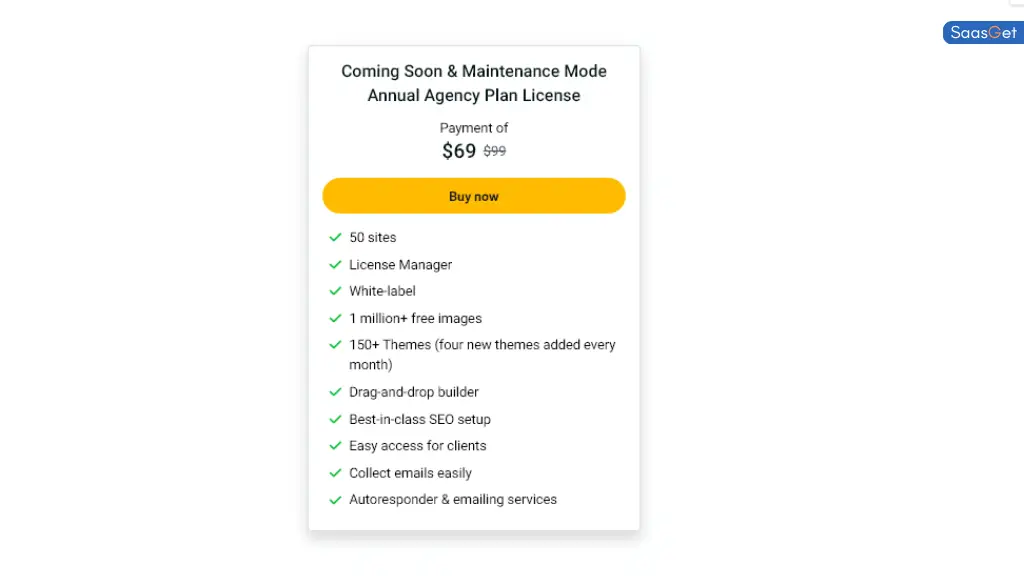
Pricing plays a vital role in any software decision. The Coming Soon & Maintenance Mode Annual Agency Plan is priced at $69 per year. This fee includes a plethora of valuable features, consistent updates, & excellent support options. Consider the following pricing breakdown:
| Plan | Duration | Price |
|---|---|---|
| Annual Agency Plan | 1 Year | $69 |
This pricing structure allows website owners to manage ongoing expenses while ensuring they have access to efficient maintenance tools. Compared to other products in this category, the pricing offers excellent value.
Limitations Coming Soon & Maintenance Mode
Despite its numerous advantages, Coming Soon & Maintenance Mode has limitations worth noting. For instance, the plugin lacks advanced analytics features. Users often want to track visitor engagement levels while the site is offline. This absence of direct visitor insights hinders ongoing marketing efforts.
User experience may also vary. Some elements may feel clunky or outdated compared to more modern competitors. Those seeking a polished feel might find this interface lacking in certain aspects. Ensuring timely updates could address this concern.
And another thing, not all templates offer complete customization. Users may feel constrained by the default settings or design constraints. This can hinder creativity & brand consistency. Exploring alternative themes or plugins alongside this product may resolve these limitations.
Case Studies
Many organizations have successfully harnessed the features of Coming Soon & Maintenance Mode. For example, a local bakery launched a new website but needed to keep customers informed about updates. By using the plugin, they effectively maintained engagement & shared exciting news with visitors. Feedback indicated that many clients appreciated updates, leading to increased social media follows.
Another tech startup employed the plugin during a significant site overhaul. They allowed stakeholders to stay informed about progress while ensuring their main page remained under wraps. Through strategic messaging, they captured leads & collected valuable feedback on new features before the official launch.
These examples highlight the effectiveness of Coming Soon & Maintenance Mode. By implementing it correctly, organizations can maintain visitor interest & engagement. Users encountering challenges creative solutions to maximize their outcomes.
Recommendations for Coming Soon & Maintenance Mode
To fully capitalize on the benefits of Coming Soon & Maintenance Mode, consider these actionable recommendations:
- Utilize strategic messaging to inform visitors.
- Integrate social media links for broader engagement.
- Regularly update content to keep users informed.
- Test your configurations on staging sites to minimize issues.
- Pair with analytics tools to track engagement metrics.
- Ensure compatibility with themes & plugins before full launch.
- Employ email sign-up forms for lead collection.
These strategies can enhance user experience during maintenance periods. Applying them ensures effective communication with visitors. Remaining proactive bridges the gap between site maintenance & visitor engagement.
Essential Features for Successful Implementation
Implement the following features for maximizing impact with Coming Soon & Maintenance Mode:
- Customizable templates for branding consistency.
- SEO-friendly features to maintain rankings.
- Responsive design for optimal viewing on all devices.
- Integration options for other tools.
- Regular updates to ensure best practices.
Incorporating these elements contributes to a strong visitor experience. Always remain focused on innovation & improvement for sustained success.
Technical Support Options
Accessing support can play a significant role in a positive experience with Coming Soon & Maintenance Mode. Users can expect multiple resource options, including:
- Comprehensive documentation guiding through setup.
- Dedicated support channels for troubleshooting.
- Community forums for user-generated tips & tricks.
- Video tutorials available for visual learners.
- Regularly updated FAQs addressing common queries.
Leveraging these support avenues empowers users to resolve issues quickly. Efficient support maximizes the product’s overall effectiveness.
Best Practices for Maintenance Mode
Follow these best practices during maintenance mode to ensure success:
- Communicate clearly when visitors can expect completion.
- Ensure all vital information remains accessible.
- Monitor feedback through email or social media channels.
- Offer incentives for returning users post-launch.
- Prioritize updates based on visitor interest & feedback.
These approaches help maintain a positive visitor relationship despite downtime. Engaging with users ensures brand loyalty continues through maintenance transitions.
Maintaining User Trust
Trust forms the cornerstone of any online relationship. Sustaining trust during maintenance requires active strategies:
- Provide transparency about changes being made.
- Establish a timetable for when updates will occur.
- Engage users with relevant content & offers.
- Encourage feedback for improvements.
- Regularly update visitors to lessen apprehension.
Building & maintaining trust leads to stronger customer relationships. Prioritize open communication to ensure users feel valued.
Analyzing Visitor Feedback
Once the site returns, analyze visitor feedback effectively. Tools & practices to adopt include:
- Surveys assessing user experience during maintenance.
- Monitor social media for mentions related to downtime.
- Use analytics tools to gauge visitor behavior post-launch.
- Engage with users via follow-up emails.
- Address common concerns prominently on the site.
Understanding visitor sentiment strengthens future decision-making. Active engagement ensures users feel heard & valued.
Final Considerations
When using Coming Soon & Maintenance Mode, always reflect on the end goal. Effective communication, user engagement, & maintaining trust carries substantial weight in online success. Committing to improvement & innovation paves the way for continued growth. Focusing on these principles contributes to overall website success.
What is a Coming Soon page?
A Coming Soon page is a temporary webpage that informs visitors that a site is being built or updated. It typically includes details about the upcoming launch & may feature a subscription form for visitors to receive updates.
How can Maintenance Mode benefit my website?
Using Maintenance Mode allows you to inform users that your site is temporarily unavailable due to updates or improvements. This keeps your audience informed & may help prevent frustration from returning visitors.
What elements should I include on my Coming Soon page?
Key elements for a Coming Soon page include a clear message about what’s coming, an eye-catching design, a countdown timer, & an option for visitors to sign up for email updates. Social media links can also be valuable for engagement.
How long should I keep my site in Maintenance Mode?
Keeping your site in Maintenance Mode should be limited to the time necessary for updates. Prolonged periods can lead to user frustration. Aim to communicate expected completion times where possible.
What are common mistakes to avoid when using Coming Soon or Maintenance Mode?
Common mistakes include failing to provide clear communication, not allowing users to subscribe for updates, or leaving the site in Maintenance Mode for too long. Ensuring your message is clear & engaging can help mitigate these issues.
Conclusion
In wrapping up, using a Coming Soon or Maintenance Mode page can greatly enhance your website’s success. These tools keep your audience informed & excited while you work behind the scenes. A well-crafted Coming Soon page builds anticipation, making visitors eager to return. Similarly, a clear Maintenance Mode notification helps manage expectations during updates, showing you care about user experience. Remember, communication is key! By effectively using these features, you’ll ensure your audience stays engaged & ready, setting the stage for a successful launch or upgrade. Happy building!